In NetSuite, Incoterms (International Commercial Terms) are used in Transfer Orders to define the point of ownership transfer between locations—either at the time of shipping or receipt. Here’s a breakdown of how Incoterms work and how to configure them:
Available Incoterms in NetSuite
NetSuite supports two default Incoterms for transfer orders:
- Ex Works (EXW): Ownership transfers at the shipping point (i.e., when the item is fulfilled).
- Delivered at Place (DAP): Ownership transfers at the destination (i.e., when the item is received)
Setting Incoterms in Transfer Orders
- Default Setup:
- Navigate to:
Setup > Accounting > Accounting Preferences- Under the Order Management subtab, find the Default Transfer Order Incoterms field.
- Choose either Shipping Point (EXW) or Destination Point (DAP).
- On Individual Transfer Orders:
- When creating a transfer order, go to the Classifications section.
- Select the appropriate Incoterm from the Incoterm dropdown field.
- Custom Incoterms:
- You can create additional Incoterms via:
Setup > Accounting > Accounting Lists
Impact on Accounting and Inventory
- EXW: Inventory is considered transferred at fulfillment. The source location loses ownership immediately.
- DAP: Inventory is transferred at receipt. The destination location gains ownership only upon receiving the goods.
- These choices affect general ledger entries, in-transit inventory tracking, and intercompany clearing accounts
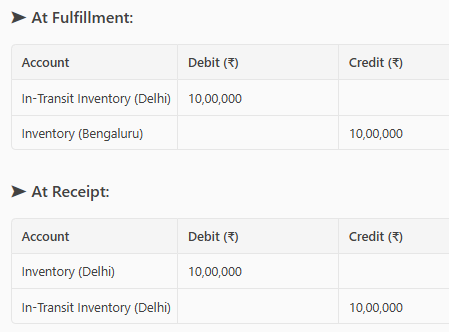
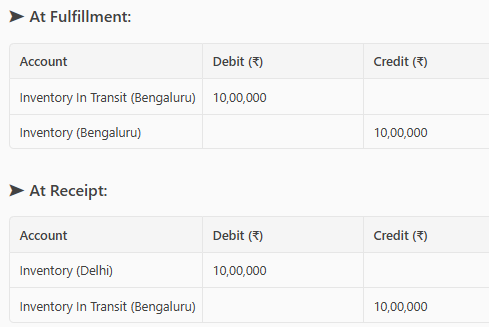
Here’s a simplified example of General Ledger (GL) impact for both EXW (Shipping Point) and DAP (Destination Point) Incoterms in a NetSuite Transfer Order scenario.
Scenario:
- Item Cost: ₹10,000
- Source Location: Bengaluru Warehouse
- Destination Location: Delhi Warehouse
- Transfer Order: 100 units of Item A
1. EXW (Shipping Point) – Ownership transfers at fulfillment
2. DAP (Destination Point) – Ownership transfers at receipt
Key Differences:
- EXW: Destination location owns the inventory during transit.
- DAP: Source location retains ownership until delivery is confirmed.