Tracking the balance between allocated hours and actual hours is crucial in the service industry, where tasks like client meetings, research, and report preparation require precise time management. Monitoring this comparison helps ensure projects stay within scope, timelines, and budgets. In NetSuite, a Project Task Saved Search can be used in providing in checking resource utilization and improve project efficiency.
How to build a Saved Search to track and compare allocated versus actual hours effectively per Project Task.
1.) Navigate to Lists > Search > Saved Searches > New
2.) Select Project Task
3.)In the Criteria tab, select
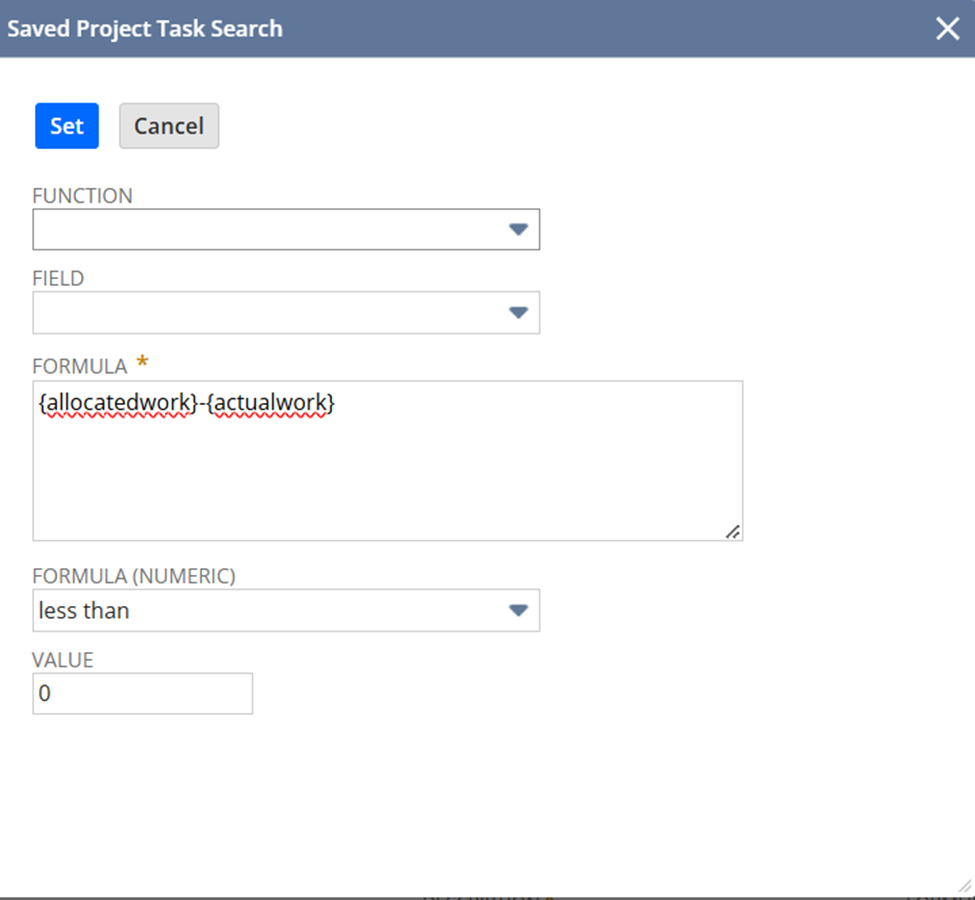
Filter: Formula (Numeric)
Formula: {allocatedwork}-{actualwork}
Parameter: less than, Value = 0
In the Results tab
Name
Project
Actual Work
Allocated Work
Formula (Numeric) | Formula: {allocatedwork}-{actualwork} | Custom Label: Time Difference

4.) Rename Search
5.) Save and Run

Result:
This will show all project tasks with Actual Work exceeding the Allocated Work