Option windows and Information in Netsuite is of the form:
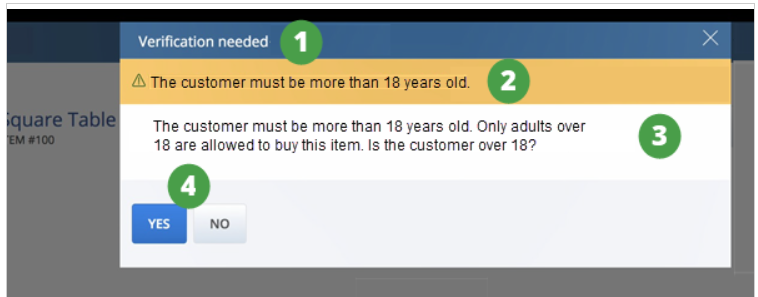
- Option window – This window enables the sales associate to choose between two options. Use the option window to display the following:
- Toast notification based on one of the status values available for extensions (warning, error, success, information).
- Paragraph with text that can be loaded dynamically.
- Two buttons that can be customized.
- Information window – This window shows an informational message. Only one action can be associated with the Information window, typically to acknowledge the message and close the popup window. Use the information window to show the following:
- Toast notification based on one of the status values available for extensions (warning, error, success, information).
- Paragraph with text that can be loaded dynamically.
- One button that can be customized.
The following describes the areas you can customize in the option window.
In order to disable the option window from being displayed by default, the following code snippet can be used:
window.onbeforeunload = null;