NetSuite supports OAuth 2.0, a robust authorization framework. OAuth 2.0 enables client applications to use a token to access NetSuite through REST web services, RESTlets, and SuiteAnalytics Connect. The application accesses the protected resources on behalf of a user who gave an explicit permission for the access. This method eliminates the need for integrations to store user credentials. Use OAuth 2.0 as an alternative to the Token-based Authentication feature. It is more straightforward to implement because request signing is not required.
Scenario:
User wants to create an Integration with OAuth 2.0 Setup.
Solution:
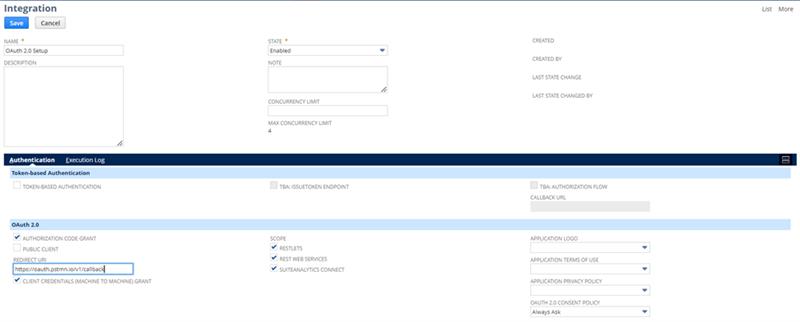
- Go to Setup > Integration > New.
- Enter a name for your application in the Name field.
- Enter a description in the Description field, if preferred.
- Select Enabled in the State field.
- On the Authentication tab, tick the appropriate boxes for your application:
- In Authorization Code Grant, tick the box if you want to implement the OAuth 2.0 authorization code grant flow for this integration.
- In Redirect URI, enter the valid redirect URI for your application, on which the authorization code will be handled. Note: The redirect URI is validated when you save the integration record.
- In Client Credentials (Machine to Machine) Grant, tick the box if you want to implement the OAuth 2.0 client credentials flow for this integration.
- In RESTlets, REST Web Services and/or SuiteAnalytics Connect, tick the box if you want to implement these for integration.
- Click Save.
Important
The system displays the client ID and client secret only the first time you save the integration record. After you leave this page, these values cannot be retrieved from the system. If you lose or forget the client ID and client secret, you will have to reset them on the Integration page, to obtain new values. Treat these values as you would a password.
For guidance, here’s the screenshot of sample creation of Integration Record