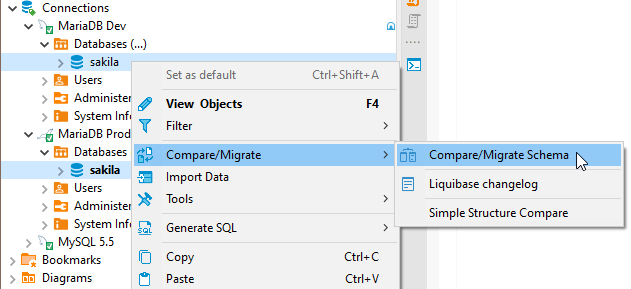
- Select the two objects (schemas, databases, or tables) you want to compare in the Database Navigator.
- Open the context menu.
- Open the sub-menu Compare/Migrate and click the Compare/Migrate Schema. You’ll see the comparison window.
Re-validate that you have chosen the correct objects to compare. You can change target and source containers by clicking the Swap sources.
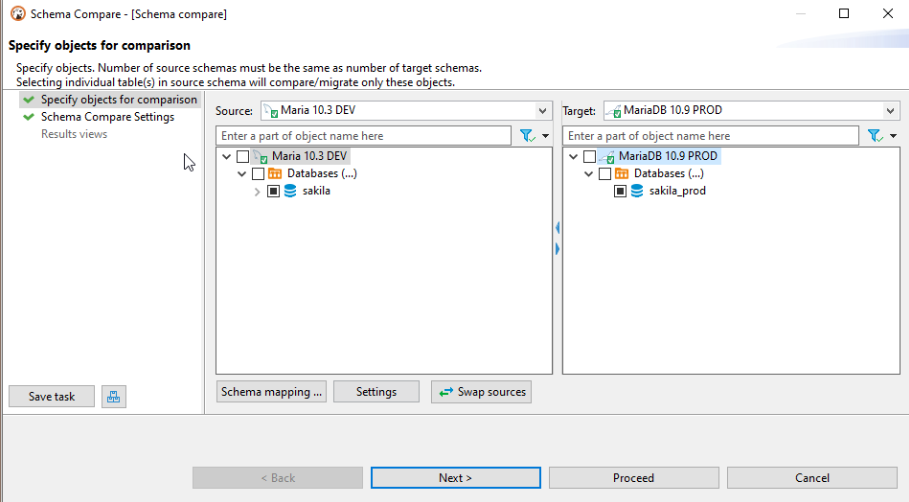
Note: You must select only those schemas/directories/containers that contain tables:
- Schemas – if the database supports schemas.
- Databases – if the database supports catalogs and does not support schemas.