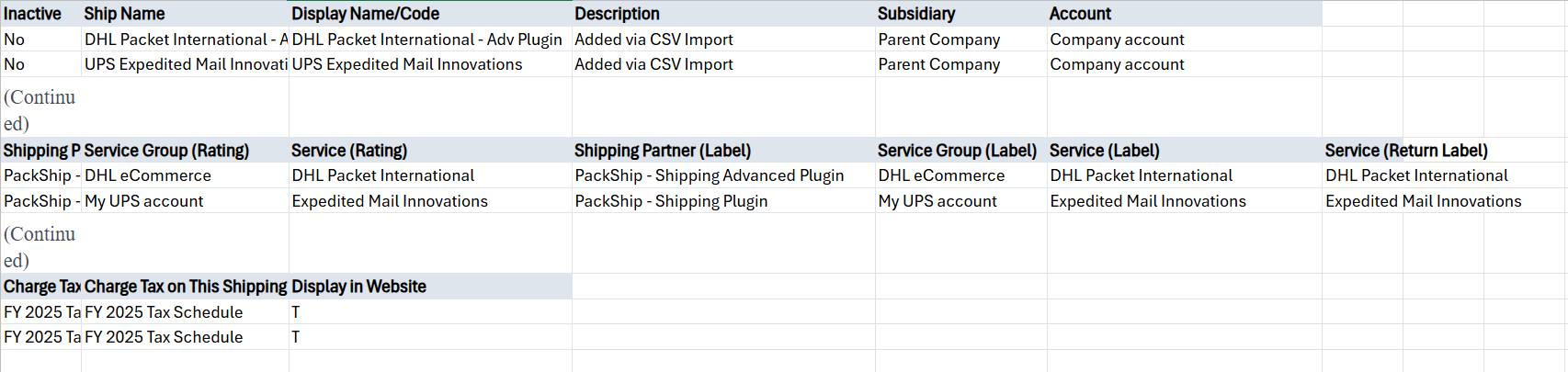
The shipping items record is used to specify settings for the plugin, labels, and tax schedule. Depending on the plugin, you can assign a carrier account for each shipping item or for each location.
- If you have a Commerce website, you can add settings for the Display in Website column.
- If you use the Shipping Label Integration feature, you can include the following columns in your CSV file: Shipping Partner (Label), Service Group (Label), and Service (Label). Be sure to assign the same plugin for the label and rating columns.
- If you set the Print Return Labels preference, you can also include the Service (Return Label) column. Note that this column applies to direct shipping on fulfillments for FedEx, UPS, or USPS only.
- After you import records, you can set the Shipping Label Integration box if you use the Shipping Label Integration feature for FedEx, UPS, or USPS only. Be sure to check this box on each shipping item for which you want to enable direct packing and shipping on fulfillments.
The shipping item record is available for import if you use the NetSuite Ship Central SuiteApp. You can create and update it using the CSV Import Assistant. Within the Import Assistant, on the Scan & Upload CSV File page, Shipping Items (Ship Central) appears as an option in the Record Type field.
Within the NetSuite UI, you can access and create a shipping item record at Lists > Accounting > Shipping Items.
The Import Assistant is available at Setup > Import/Export > Import Tasks > Import CSV Records. After you select the record type for import, choose the import character encoding.
Shipping Items (Ship Central) CSV File Format Example
Refer to the following examples of shipping items for each Ship Central plugin.