By default, NetSuite generates transaction numbers automatically (eg. sales orders, invoices, purchase orders). While functional, many businesses benefit from custom transaction numbering to improve tracking, reporting, and operational clarity. Custom numbers can include prefixes, suffixes, or meaningful codes that reflect department, location, or order type.
Implementation
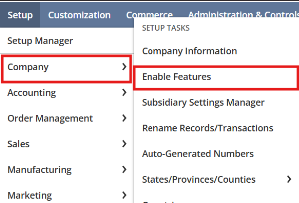
1.Navigate to Auto-Generated Numbers
- Setup → Company → Auto-Generated Numbers
2.Select the Transaction Type
- Example: Sales Orders, Invoices, Purchase Orders
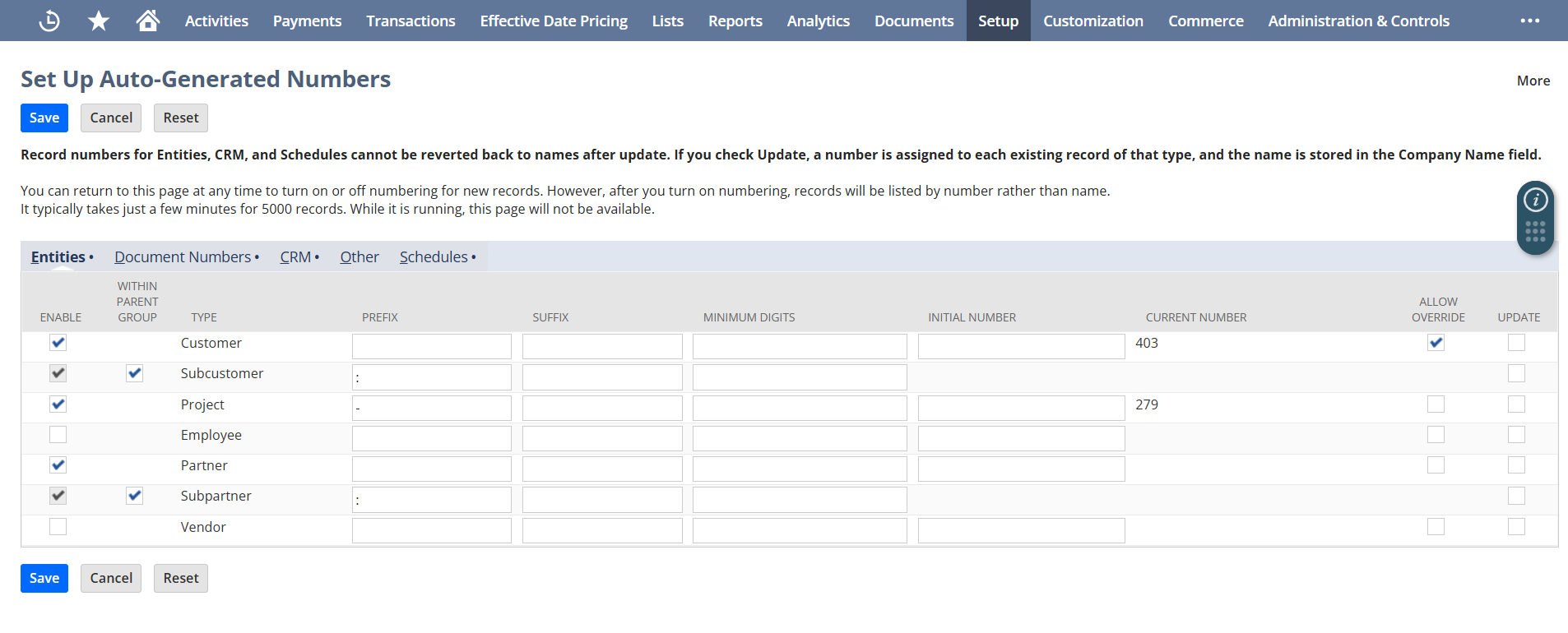
3.Enable Custom Prefix/Suffix
- Example:
SO-IND-2025-001 SO= Sales OrderIND= India Subsidiary2025= Year001= Sequential number
4.Use Scripts or Workflows for Advanced Customization
- Use SuiteScript to dynamically assign numbers based on conditions:
- Sales channel (Online, Retail, B2B)
- Customer category
- Product type or department
5.Test in Sandbox
- Ensure uniqueness and consistency across subsidiaries and transaction types.
Advantages of using custom transaction numbers in sales processes
- Distinguish between domestic and international orders.
- Identify orders by sales channels or departments.
- Improve searchability in saved searches and reports.
- Support audit and compliance by making transaction IDs more meaningful.
- Reduce errors in multi-location or multi-department operations.