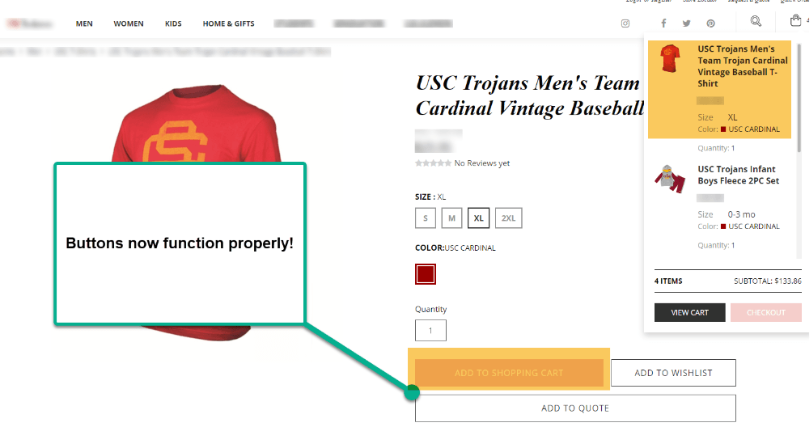
On the SuiteCommerce store, the Product Display Page buttons “Add to Shopping Cart,” “Add to Wishlist,” and “Add to Quote” did not function. When the website user clicked, the item was not added to the shopping cart or the quote. The PLP “Add to Cart” button functioned as it should, yet it did not function on the PDP.
Solution: Resolve Item Option Configuration Error
An error in setting up the item options on the website was preventing the buttons from functioning properly. To get the buttons working, we needed to fix the incorrectly configured Item Options Subtab in the Configuration Record.
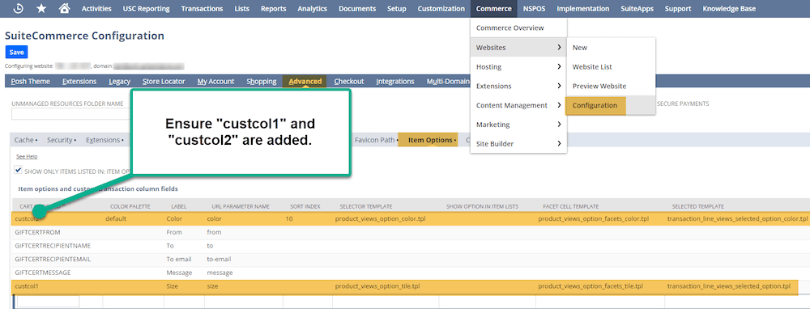 Commerce > Websites > Configuration – Advanced Tab; Item Options subtab
In our case, we needed to mirror the orange highlighted rows above, “custcol1” for the Color template, and “custcol2”. Then, we needed to commit a cache invalidation request and hard refresh the page (CTRL + Shift + R).
After completing those steps, we clicked the PDP buttons to see if they were working. The issue was resolved!
Note: Having clear Field Help setup can be helpful in preventing the custom item field errors that led to this problem.