ou can use internal NetSuite IDs to dynamically generate values in the Cc, Bcc, and Body fields on a Send Email action.
For example, if the record in the workflow is a sales order, to generate the email as if it was sent by the sales rep for the customer, use the {salesrep} internal ID in the Body field:
          Thank you {entity}, for your order. We will notify you shortly regarding your shipping date.

Sincerely,
{salesrep}
You can also reference data from joined records using dot notation. For example, to add the email for the sales rep to the above email, use {salesrep.email}.
Note: Internal and Field IDs must enable the Show Internal IDs preference.
To use NetSuite internal Ids:
- Go to the record that contains the field that you want to reference.
- Hover above the field you want to reference.
- Click on the field name to open the Field Help.
- Copy the Field ID value.
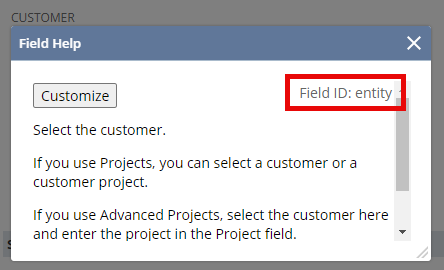
- Insert the field id value, in between curly braces, in the Send Email action field where you want to reference the record field. For example,
{entity}.