To customize your NetSuite account with workflows, first enable SuiteFlow in your account.
To enable SuiteFlow:
- Go to Setup > Company > Enable Features > SuiteCloud.
- In the SuiteCloud tab, check the SuiteFlow box.
- Click Save.
Note: Set the user’s role with permission to use Suiteflow. For access to all SuiteFlow functionality, use the Administrator role.
After SuiteFlow is enabled, you can add new workflows.
To add a new workflow:
- Go to Customization > Workflow > Workflows > New.
- Fill in the fields as required for your customization.
- Click Save.
Note: NetSuite provides workflow templates that cover common scenarios, such as sales order and purchase order approvals.
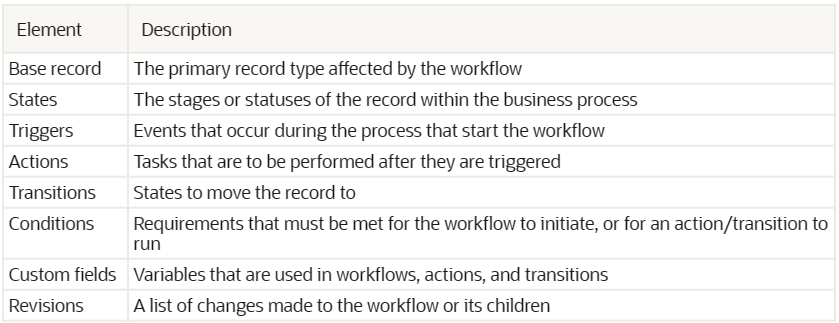
Workflows contain many different elements including record types, events, and actions. The following table provides a general overview.